

Ransomware remains one of the most disruptive threats facing small and mid-sized businesses, and increasingly, it’s the threat aimed squarely at them. According to Verizon’s 2025 Data Breach Investigations Report, ransomware showed up in 88% of breaches at small and mid-sized businesses, compared to 39% at large organizations.
Attackers have figured out that smaller companies often have the same valuable data as enterprises, with fewer people and tighter budgets defending it.
But here’s what the headlines miss: ransomware is rarely the result of a single security failure.
Most successful attacks exploit a combination of gaps—a compromised account, a reused password, an unpatched server, a backup nobody tested, or an employee who never learned what a phishing email looks like. And modern attacks increasingly go after identities, cloud accounts, and business processes, not just the servers in your back room.
The good news? You don’t need an enterprise budget to close most of those gaps. A handful of practical measures will meaningfully lower your risk. This checklist is a straightforward place to start.
What Is Ransomware?
Ransomware is a type of cyberattack that locks an organization out of its systems, applications, or data until a payment demand is met.
It’s usually associated with encrypted files, but the real damage runs deeper. For many small and mid-sized businesses, a ransomware incident can disrupt operations, delay customer service, interrupt revenue, create compliance concerns, and result in significant recovery costs.
Modern ransomware attacks increasingly involve data exfiltration, where attackers steal sensitive information before encrypting systems. According to Arctic Wolf’s 2025 Threat Report, 96% of ransomware cases included data theft as cybercriminals double down on extortion.
In many cases, the reputational, regulatory, and legal consequences of stolen data can be more damaging than the disruption caused by encryption itself.
The goal of prevention isn’t to eliminate risk entirely, no one can. The goal is to make an attack far less likely, and to make sure your business can recover quickly if one gets through.
Your SMB Ransomware Prevention Checklist
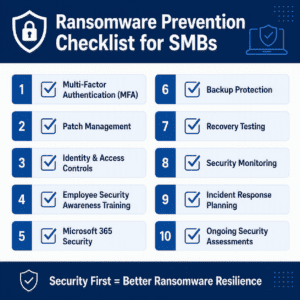
1. Turn On Multi-Factor Authentication (MFA)
Many ransomware attacks start with compromised credentials, stolen passwords, or other forms of identity-based access. Consider this: one employee reuses their work password on a breached shopping site, and suddenly an attacker has a working key to your network.
Multi-factor Authentication (MFA) is like requiring a second form of identification before someone can enter the building. Even if an attacker has the key, they still can’t prove they belong there.
For organizations using Microsoft 365, Conditional Access can strengthen identity security even further by helping ensure users are accessing systems from trusted devices and approved locations.
At a minimum, enforce MFA for:
- Microsoft 365 accounts
- Email access
- Administrative accounts
- Remote access solutions
- VPN connections
Review your authentication methods regularly, and confirm MFA is applied consistently across every user and every admin in your Microsoft 365 environment. While any form of MFA is better than none, certain types like FIDO2 should be your baseline defense. Other types like SMS are no longer considered strong and secure. Reach out to us to find out more.
2. Keep Systems Patched and Updated
Most attacks don’t need a zero-day. Attackers go after known vulnerabilities: flaws that already have a fix but haven’t been patched. They move fast, often exploiting a flaw within days of the release of the patch.
A dependable patching process covers:
- Operating systems (Windows, macOS, servers)
- Firewalls, VPNs, and remote access gateways
- Switches, access points, and other network gear
- Third-party apps (browsers, PDF readers, Zoom, Java)
- Hypervisors and backup systems
Patching isn’t only about installing updates.
It also means:
- Patching actively exploited flaws first
- Verifying that patches applied
- Replacing end-of-life gear that no longer gets updates
Putting off updates feels harmless. But automated scanners sweep the internet nonstop, and an exposed, unpatched system gets found quickly.
3. Tighten Identity and Access Controls
Not everyone needs access to everything. When you limit what each account can reach, you also limit how far an attacker can go if that account is compromised.
A few habits that pay off:
- Review user access on a set schedule
- Adopt single sign-on when able with Conditional Access tied to it to control access by device, location or health status
- Remove unused accounts right away
- Keep administrative privileges to a minimum
- Apply least privilege principles
- Watch privileged accounts more closely than the rest
Identity has quietly become the front line of modern cybersecurity, because attackers would rather log in with valid credentials than break through your firewall.
4. Train Your Team to Spot Threats
Your employees are either your weakest link or your best sensor—training decides which.
Help them confidently recognize:
- Phishing emails
- Suspicious links
- Fake login pages
- Social engineering attempts
- Unexpected attachments
- Fraudulent requests (like a “quick favor” from the CEO)
A single annual session won’t cut it. Short, regular touchpoints keep people sharp as the tactics evolve. Just as important, employees should know how and when to report suspicious activity. The sooner a potential threat is reported, the faster it can be investigated and contained.
5. Lock Down Microsoft 365 and Cloud Apps
A lot of businesses assume Microsoft 365 is secure out of the box. Microsoft gives you powerful tools—but configuring, managing, and monitoring them is on you.
Worth reviewing:
- MFA enforcement
- Email protection settings
- Conditional access policies
- Account permissions
- SharePoint sharing settings
- OneDrive access controls
- Admin account management
A well-managed Microsoft environment does a surprising amount of heavy lifting in reducing ransomware risk.
6. Verify Your Backup Strategy
Ask yourself one question: If everything were encrypted today, how fast could we recover?
Plenty of businesses have backups but have never confirmed they’d hold up during a real attack.
A resilient strategy should protect:
- Critical business systems
- Microsoft 365 data
- Cloud workloads
- Endpoints and servers
- Secure offsite storage
Make sure your backups can’t be deleted or altered by a compromised account. Immutable backups—ones that can’t be changed once written—are especially valuable during a ransomware event.
7. Test Your Recovery Procedures
A backup you’ve never restored from is a guess, not a plan.
Regularly test:
- File recovery
- Server recovery
- Microsoft 365 recovery
- Business application recovery
- Full disaster recovery
Testing validates how long recovery really takes and surfaces weak spots before an incident does. (ACC’s own security assessment specifically checks whether recovery procedures have been tested and documented.)
8. Monitor for Suspicious Activity
The sooner you catch something unusual, the better your odds of containing it before it spreads.
Look for solutions that flag:
- Unusual login behavior
- Signs of account compromise
- Suspicious endpoint activity
- Unauthorized privilege changes
- Early ransomware indicators
Good monitoring is about catching real attacks fast and responding before they move across your environment.
9. Build an Incident Response Plan
In the middle of an attack, confusion costs you time you don’t have.
Everyone should already know:
- Who’s responsible for responding
- How incidents get escalated
- Which systems are mission-critical
- How you’ll communicate (internally and with customers)
- When to bring in outside partners
A written plan lets your team act decisively when minutes matter.
10. Treat Security as an Ongoing Process
Ransomware prevention isn’t a one-time project you finish and file away.
The businesses that stay resilient tend to:
- Run regular security assessments
- Revisit access permissions
- Watch for emerging risks
- Update their controls
- Keep recovery-ready
- Reinforce employee awareness
The most protected organizations treat security as a habit, not a fire drill.
What Businesses Often Overlook
The biggest misconception? That ransomware is purely IT’s problem.
In reality, preparedness pulls together:
- Identity security
- User awareness
- Endpoint protection
- Backup and recovery
- Business continuity planning
- Governance and oversight
A gap in any one of these raises your overall risk. A security-first approach makes sure these pieces reinforce each other instead of being managed in isolation.
Final Thoughts
Ransomware keeps evolving, but the fundamentals of stopping it haven’t changed much. Strong identity protection, well-configured Microsoft 365, a team that knows what to watch for, reliable backups, tested recovery, and steady oversight will take you a long way.
The real question isn’t whether you own security tools.
It’s this: If a ransomware incident hit tomorrow, how confident are you that your business could contain it and recover quickly?
Frequently Asked Questions
How can a small business prevent ransomware?
Small businesses can prevent ransomware by starting with the basics that stop the most common attack paths: enable MFA everywhere, keep systems patched, limit user access, train employees to spot phishing, and maintain tested, immutable backups. Most SMB ransomware incidents trace back to a gap in one of these areas.
What is the most effective defense against ransomware?
There’s no single silver bullet, but the most effective defense against ransomware comes from layering identity security (MFA and least-privilege access), employee awareness, patching, and tested backups—so that if one layer fails, others still stand.
Should a business pay the ransom?
Paying is discouraged by security authorities. It doesn’t guarantee your data comes back, it may invite repeat attacks, and it funds the criminal ecosystem. Tested backups and a solid recovery plan are what get you back online—which is why most victims now refuse to pay.
Are small businesses really targeted by ransomware?
Yes, small businesses are targeted by ransomware more than large ones, proportionally. Verizon’s 2025 DBIR found ransomware in 88% of SMB breaches versus 39% at large enterprises, largely because smaller companies tend to have leaner security resources.