




Table of Contents
The office manager is chasing a copier ticket before payroll checks print. Down the hall, an internal IT lead is sorting Microsoft 365 access requests while a controller waits on invoice approvals. When every request lands in the same inbox, small fixes, customer-facing interruptions, and real security concerns compete for the same attention.
That’s why IT support tiers matter. They shape response time, cost control, cybersecurity follow-through, and how much productive work gets interrupted. With a global shortage of 4.8 million cybersecurity professionals, clear routing is practical risk management, not paperwork.
Stephen Rost, Director of Development Services at ACC Technical Services, notes: “Good support design starts by asking what work is being delayed, then matching each request to the right skill level, system owner, and business priority.”
IT Support Tiers Explained For Everyday Business Operations
Support tiers exist so a password reset, printer jam, firewall alert, and server issue don’t all wait behind the same ticket. The point is simple: handle common requests quickly, move complex work to deeper expertise, and keep staff from explaining the same issue repeatedly.
When we walk through IT support tiers explained in client conversations, we tie the model to real workflows instead of a chart on a wall. A Microsoft Unified economic analysis found support ticket volume for Microsoft product issues dropped 35% and tickets were resolved 30% faster, avoiding 15,750 hours over three years. More than 68% of survey respondents also reported faster time to resolution for ticketing and incident response.
-
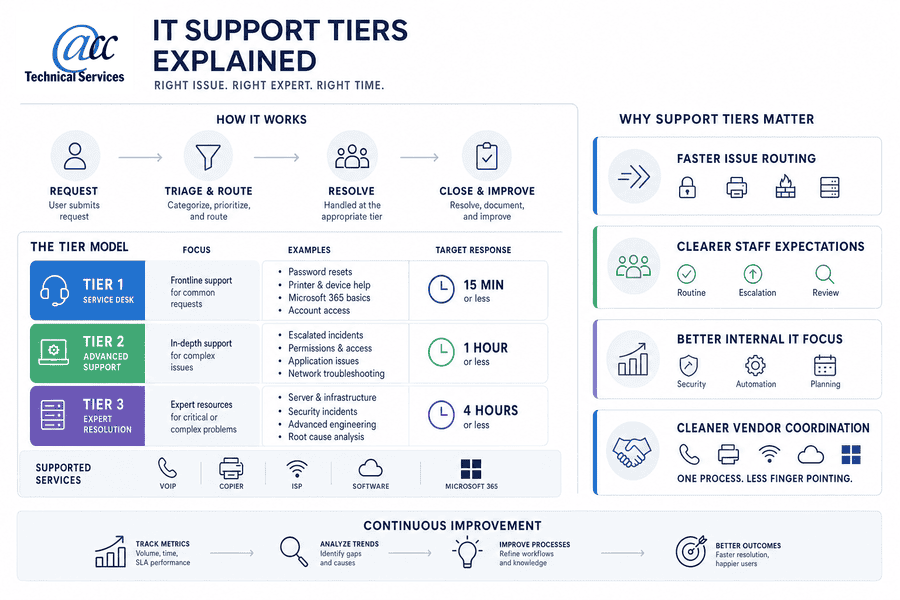
Faster issue routing: Password resets, printer triage, firewall alerts, and server problems need different skills and urgency. One queue slows the whole day down.
-
Clearer staff expectations: Employees know whether a Microsoft 365 access question is routine helpdesk work, an escalation, or part of a larger permissions review.
-
Better internal IT focus: Supplemental support helps an internal IT lead spend less time on repeat tickets and more time on security, automation, and planning.
-
Cleaner vendor coordination: VoIP, copier, ISP, software, and Microsoft 365 vendors can be managed through one process, reducing finger pointing when service is interrupted.
What Is The Difference Between Different IT Support Tiers In Practical Terms
A staff member can’t open a shared Microsoft 365 file, a firewall alert lands in the monitoring queue, and incoming VoIP calls start dropping before lunch. Those tickets all affect work, but they don’t require the same skill set, urgency, or business judgment. That’s the practical answer to what is the difference between different IT support tiers.
-
Tier one handles access. Password resets, basic device help, printer triage, and common Microsoft 365 questions belong here. These tickets need accuracy and clear notes.
-
Tier two resolves deeper issues. Network troubleshooting, endpoint problems, software conflicts, and repeat issue analysis move here when the first fix doesn’t hold.
-
Tier three owns complex systems. Servers, Azure services, firewalls, cybersecurity investigation, backups, and advanced escalations need senior technical review and business context.
-
Project teams handle planned work. Cabling, office relocation, camera systems, door access, procurement, and VoIP rollouts require scheduling, approvals, and coordination across vendors.
-
Strategic support guides decisions. vCIO planning connects budgeting, compliance, software licensing, business continuity, and roadmap work to what support data is already showing.
Specific Domain Scenario: During an office move, cabling has to be ready before workstations arrive, Microsoft 365 access must follow the right users, and VoIP phones need tested call flows before opening day. Door access and security cameras also need timing with facilities, installers, and leadership approvals. Treating that as ordinary helpdesk work creates gaps during moving week.
Tiers Of IT Support And The Business Cost Of Poor Escalation
Support tiers aren’t just an IT chart. They affect how quickly staff serve customers, process invoices, meet compliance needs, and keep systems available when a normal workday gets interrupted. The Microsoft Unified analysis shows why escalation design matters: the composite organization reduced Microsoft product issue ticket volume by 35%, resolved tickets 30% faster, and avoided 15,750 hours over three years.
-
Tickets stall in limbo. Unclear escalation leads to repeated explanations, duplicate troubleshooting, and avoidable downtime. More than 68% of surveyed respondents reported faster time to resolution for ticketing and incident response with Microsoft Unified.
-
Internal IT loses capacity. Skilled staff get pulled into password resets and printer tickets instead of security reviews, planning, automation, or system improvements.
-
Security issues wait too long. Firewall alerts, suspicious logins, breach investigation, and endpoint warnings need defined escalation in a layered defense model. A survey found a full 56 minutes pass on average before anyone acts on an alert, and 13% of social engineering incidents were traced back to ignored or untriaged security alerts.
-
Vendors slow decisions down. Copier, VoIP, ISP, software, and cloud vendors delay resolution when no one owns coordination. A vendor-agnostic best-of-breed approach still needs one party tracking the ticket, the contract, and the next step.
-
Planning turns reactive. Procurement, licensing, Azure services, compliance, and budgeting suffer when support data isn’t reviewed with leadership. During the July 2024 CrowdStrike outage, researchers found 759 U.S. hospitals experienced IT outages, with 1,098 distinct network services affected, including 21.8% direct patient-facing services and 15.4% operationally relevant services.
The business cost of poor escalation is easier to control when support design matches real service demand. Four capability areas matter most: managed IT, cybersecurity, vendor management, vCIO planning. That is what makes tiers of IT support work as a practical operating model.
Related IT Support Guides
IT Technical Support Tiers That Fit Your Team And Risk Profile
Changing support structure can feel awkward when everyone is used to emailing the same person for every issue. The goal isn’t bureaucracy; it’s better routing, visibility, and planning around your team size, risk profile, compliance needs, growth plans, and technology stack. We often start by looking at where the work is already going, then deciding which IT technical support tiers should handle each request type. Budget pressure is part of the conversation, too: managed services spending rose to 18% of IT budgets in 2023, up from 15% before the pandemic.
-
Map recent ticket demand: Review the last sixty to ninety days by category, business impact, system, and repeat issue patterns. Apple environments deserve the same review, since survey respondents reported a 24% reduction in help desk tickets tied to reduced troubleshooting and maintenance effort.
-
Separate different work types: Helpdesk requests, cybersecurity alerts, vendor escalations, project work, and planning needs should not compete in one informal inbox. Given the global shortage of 4.8 million cybersecurity professionals, security triage should not depend on ad hoc availability.
-
Choose the right coverage: Decide where internal staff stay hands-on and where fully managed IT, supplemental support, dedicated teams for managed clients, or project-based expertise makes more sense.
-
Document escalation rules: Spell out paths for Microsoft 365, Azure services, firewalls, backups, VoIP, Apple support, printers, and line-of-business software.
-
Review trends with leadership: A vCIO or Technical Account Manager process turns ticket history into decisions about budget, compliance, procurement, licensing, data security, and business continuity. Specialized needs such as Security Services, Development Services, AI & Machine Learning Solutions, and Azure Services may sit outside routine helpdesk work.
Get IT Support Tiers Working
ACC Technical Services can help route daily requests and higher-risk issues to the right expertise faster.
IT Support Tiers That Keep Daily Work Moving
When an office manager is chasing printer issues while an internal IT lead sorts Microsoft 365 access tickets, firewall alerts, VoIP problems, Azure services, vendor follow-ups, and budget questions in the same thread, it’s time to look at how IT support tiers are working. The right structure helps route issues, protect systems, reduce vendor friction, and give leadership a clearer view of technology needs before small patterns become expensive surprises.
ACC Technical Services is headquartered in Syracuse, and we help organizations plan practical support models across managed IT, cybersecurity, vendor management, Microsoft 365, Azure services, and vCIO planning. Contact us to talk through your current setup, and new clients can also ask about a free 60-minute assessment or free Cyber and IT Health assessment.